
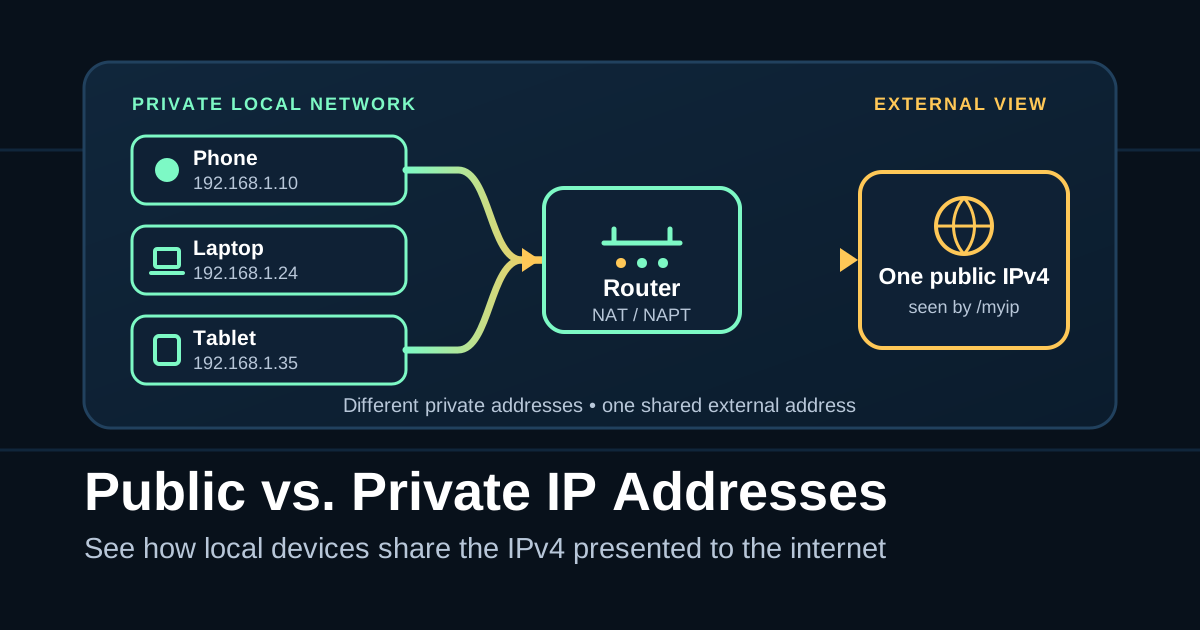
Your laptop, phone, router, and an IP-checking site can all show different addresses without anything being broken. In a typical home IPv4 setup, each device uses a private address on the local network while a router presents another address beyond that network.
This guide focuses on IPv4. It explains what each address means, why Network Address Translation (NAT) changes what the internet sees, and how to compare the values without changing any network settings.
The Short Version
- Your device’s private IPv4 address works on its local network. Private addresses can be reused on other private networks and do not have global routing meaning.
- /myip shows the public IPv4 presented by that browser’s current request. It is not necessarily an address assigned directly to the device.
- A home router can let several devices share one external IPv4 address. The devices keep different private addresses, but
/myipmay show the same result on each one. - An internet service provider can add another translation layer. Carrier-grade NAT, or CGN, can make several subscribers share a public IPv4 and can make a router’s WAN address differ from
/myip. - An address outside the three private ranges is not automatically public. IPv4 includes other special-purpose ranges, including the shared space used for CGN.
Check This First
Open My IP in the browser and network state you want to investigate. If the problem happens while you are connected to a required VPN, keep the VPN connected. Record:
- the IPv4 shown by the tool;
- whether the device is using Wi-Fi, Ethernet, cellular service, or a hotspot; and
- whether a VPN or office network route is active.
Refresh the result once if you want to confirm it. Your browser sends a request to ipify’s IPv4 endpoint, and the tool displays the address returned for that request. Treat it as the public IPv4 presented by this browser route, not as one universal address for every application or interface on the device.
This check is read-only. Do not change DHCP, WAN, NAT, firewall, or port-forwarding settings just to identify the addresses. If policy permits a VPN comparison, record the connected and disconnected results; do not change a required security setup for the sake of the test.
What’s Actually Happening
For this comparison, the important question is not only “What is the address?” but also “Where does this address apply?”
In a common home setup, the path has four useful reference points:
- The device has an address on the local network.
- The router’s LAN side faces devices on that local network.
- The router’s WAN or Internet side faces the next network upstream.
- An external endpoint sees the source address presented after any translation along the route.
The three private IPv4 ranges
RFC 1918 reserves exactly three blocks for private IPv4 use:
Classless Inter-Domain Routing (CIDR) is the slash-prefix notation used in the table. The number after the slash tells you how many leading bits define the address block.
| CIDR block | Complete private range |
|---|---|
10.0.0.0/8 | 10.0.0.0 through 10.255.255.255 |
172.16.0.0/12 | 172.16.0.0 through 172.31.255.255 |
192.168.0.0/16 | 192.168.0.0 through 192.168.255.255 |
The middle block is easy to misread: it covers addresses whose first two numbers run from 172.16 through 172.31, not every address beginning with 172.
Separate homes and offices can reuse these private blocks because the addresses are meaningful only within their private routing domains. Your laptop can be 192.168.1.24 at home while an unrelated laptop elsewhere uses the same address.
How several devices share one external address
NAT maps addresses between different address realms by changing packet addresses in transit and keeping translation state. The common many-to-one form is Network Address Port Translation, or NAPT. You may also see NAPT called Port Address Translation (PAT); Cisco documentation also uses the label NAT overloading. People often use the shorter term “NAT” for both.
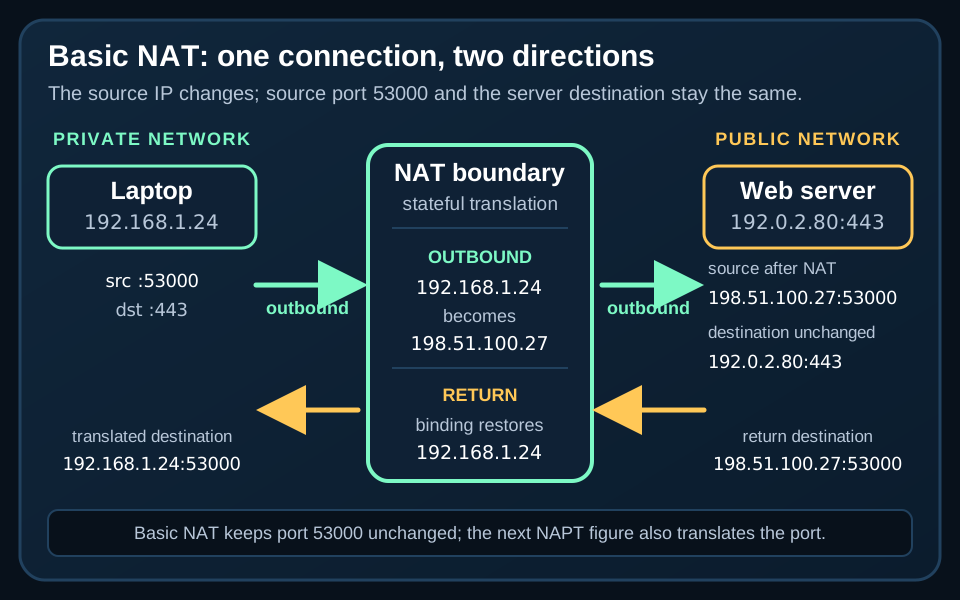
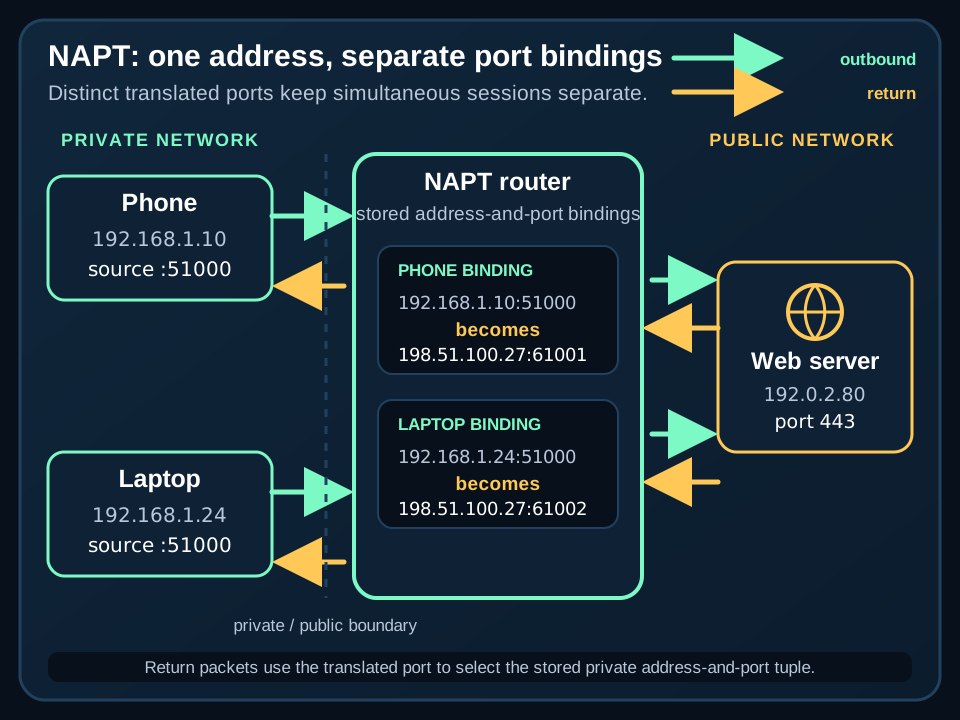
When a device starts a connection, a router performing NAPT replaces the device’s private source address and port with an external address and a translated port. The router records that mapping. When a response returns, the stored address-and-port binding directs it to the correct local device and session.
That is why a phone at 192.168.1.10 and a laptop at 192.168.1.24 can use the internet at the same time while /myip reports the same external IPv4 on both. Their local addresses remain different; the translated address is shared.
If you are also untangling how names lead to addresses, the DNS guide explains how DNS resolves names to addresses. DNS and NAT solve different problems: DNS returns an address, while NAT changes how an address is presented across network boundaries.
The Troubleshooting Ladder
Use this sequence to classify the addresses before drawing conclusions. Every step is observational.
- Record
/myipon the affected route. Open My IP from the browser, network, and VPN state involved in the problem. Write down the result and that connection context. - Record the device’s IPv4 address. Open the device’s connection details and view, but do not edit, its current IPv4 value.
- Classify the device address. Compare it with the three exact RFC 1918 ranges above. A match means the address is private-use IPv4.
- Optionally view the router’s upstream address. If you are authorized to access the router, look only at its status page. Vendors may call the field WAN, Internet, or IPv4 address. Do not change it.
- Compare the device with
/myip. A private device address and a different/myipvalue are expected when NAT sits between the device and the external endpoint. - Compare the router WAN value with
/myip. If they match, this comparison does not show an additional source-address translation after the router. It does not prove the entire path or topology. - Account for the browser’s current route. If the values differ, first note whether a VPN, hotspot, office gateway, or other documented route change is active. These paths can change the public IPv4 presented by the browser.
- Check for Shared Address Space. If the router’s WAN address falls from
100.64.0.0through100.127.255.255(100.64.0.0/10) and/myipshows a different address, that is strong evidence of provider-side CGN. Ask the ISP about public-address or inbound-service options instead of changing router settings. - Treat an RFC 1918 WAN value carefully. If the router WAN address is private and
/myipdiffers on the same non-VPN route, upstream translation is present. That comparison alone does not identify the provider’s complete design. - Compare routes only when permitted. If policy and safety allow, record VPN-on and VPN-off results or compare the normal connection with an alternate access path. Keep the observations separate and avoid permanent configuration changes.
If you need to inspect where an address falls within a CIDR block, the subnet calculator can help. Classification still depends on using the correct special-purpose range, not merely on whether an address appears unfamiliar.
Under the Hood
NAT becomes easier to reason about when you follow both the address and the port.
Suppose a laptop starts an outbound connection from its private IPv4 and a local source port. A router performing NAPT creates a binding like this:
| Point in the path | Source presented for the connection |
|---|---|
| Laptop on the LAN | Laptop private IPv4 + local source port |
| Beyond the router | Router external IPv4 + translated source port |
Another device can use the same router external IPv4 because the translator assigns and tracks a different address-and-port binding. Return packets must pass back through that translator so it can restore the private destination and deliver the response to the correct session.
RFC 2663 and RFC 3022 define the terminology and illustrate these traditional NAT mechanics. They explain the model used here; they do not guarantee that every modern router implements every NAT behavior in exactly the same way.
When the ISP adds a second boundary
Premises NAT sits in the customer’s router. Carrier-grade NAT sits in the ISP network and can share one public IPv4 among several subscribers. The subscriber has limited or no control over that outer translator.
A two-layer path can look like this:
- A device uses an RFC 1918 address such as
192.168.1.24. - The customer router translates that connection and presents a WAN address such as
100.64.12.34. - The ISP’s CGN translates again and presents a public IPv4 to the external endpoint.
/myipreports the address presented after that outer translation.
This model explains why the device address, router WAN address, and /myip value can all differ. It is evidence of translation boundaries, not a complete map of every network component between the browser and the endpoint.
When Things Get Weird
100.64.0.0/10 is shared space, not RFC 1918 space
The IETF reserved 100.64.0.0/10 as Shared Address Space for provider CGN deployments. It is separate from the three RFC 1918 private-use blocks, and it is not globally reachable. Its full span is 100.64.0.0 through 100.127.255.255.
”Not private” does not always mean “public”
The IANA IPv4 Special-Purpose Address Registry includes other blocks that are not globally reachable, including shared, loopback, link-local, and documentation space. If an address falls outside RFC 1918, classify it against the registry before calling it public.
One public IPv4 may represent many devices—or subscribers
Home NAPT can place several devices behind one public IPv4. CGN can go one level further and place several subscribers behind one public IPv4. An observed public address therefore does not necessarily identify one device, one router, or even one subscriber.
A VPN or another access path changes the comparison
The /myip result belongs to the browser’s current route. A VPN, hotspot, office gateway, or different access path can legitimately produce another public IPv4 even when the device’s local Wi-Fi address stays the same. Record the route with each result so you do not compare unlike conditions.
Router port forwarding may stop at the provider boundary
Behind CGN, a port forward on the home router may not make an inbound service reachable. The ISP controls another translation boundary, and unsolicited inbound connections would also need a suitable mapping there. Confirm the available service options with the ISP instead of experimenting with router security settings.
RFC 1918 does not apply to IPv6
The private ranges in this guide are IPv4-only. IPv6 defines Unique Local Addresses within FC00::/7 for local communication; they are not expected to be routed on the global internet. The current /myip tool specifically requests and labels IPv4, so do not use its result as a complete inventory of the device’s IPv6 addresses.
Finally, do not treat a private address, NAT, or a mismatch between addresses as a security guarantee or proof of a fault. These observations describe address scope and translation. Use them to narrow the question, then confirm provider details when the boundary is outside your control.
Source Notes
The address ranges and translation model in this guide come from primary standards and the current tool implementation:
- RFC 1918 defines the three private-use IPv4 blocks, their reusable local scope, and their lack of global routing meaning.
- RFC 2663 defines NAT and NAPT terminology, including address-realm translation, maintained state, and multiplexing several private hosts onto one external address.
- Cisco’s IW9165E PAT guide identifies PAT as another name for NAPT, while its IOS XE NAT guide also uses NAT overloading for PAT.
- RFC 3022 provides traditional NAT and NAPT packet examples, return-path bindings, and the small-office model in which several devices use one router address. Its examples describe the translation model rather than prescribing every behavior of every modern router.
- RFC 6598 allocates
100.64.0.0/10as Shared Address Space and describes its use between customer-premises equipment and provider CGN. - RFC 6888 defines carrier-grade NAT as an ISP-controlled function that can share one IPv4 address among several subscribers and documents the limits of subscriber control.
- The current IANA IPv4 Special-Purpose Address Registry distinguishes private-use, shared, and other special-purpose blocks and records whether each is globally reachable.
- RFC 4193 defines IPv6 Unique Local Addresses in
FC00::/7and their local, rather than global-internet, scope. - The public My IP page describes the result as the public IPv4 presented by the current browser route. The public browser script shows that the tool currently fetches ipify’s IPv4 JSON endpoint and renders the returned value. ipify’s documentation identifies that endpoint and its JSON response format.